
Lessons from Microchip: Why GUI Simplicity Matters in Industrial Displays
Microchip’s low-cost touchscreen reference solution demonstrates why GUI simplicity is essential for industrial and embedded systems. Discover how minimalism enhances usability, reduces hardware cost, and bridges UI design with SBC-level constraints.
Introduction
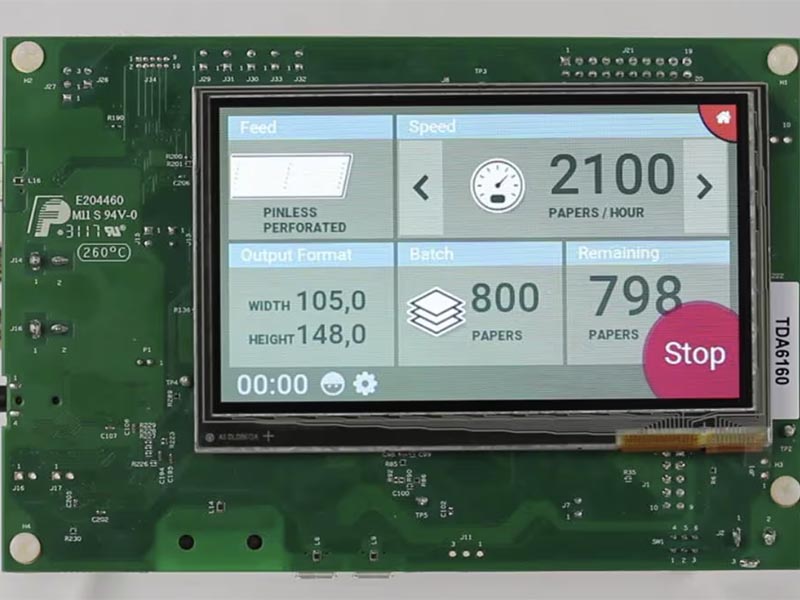
When Microchip released its Unique Low-Cost Touchscreen Reference Solution, the focus wasn’t just on cost — it was on usability.
In an era where embedded HMI systems are becoming more complex, Microchip’s emphasis on user-friendly graphical interfaces serves as a critical reminder:
Simplicity wins in industrial environments.
The solution features a 480×320 HVGA Smart Display module with a Capacitive Touch Sensor Overlay from our display partner Rocktech Displays, demonstrating that effective design doesn’t need to rely on high-end hardware.
💡 Why Simplicity Is a Strength
Industrial and embedded devices are often used in harsh or high-stress environments — factories, medical equipment, transportation systems — where users don’t have time to learn complicated interfaces.
A clean, intuitive GUI brings tangible advantages:
- Reduces training costs
- Prevents user input errors
- Improves operational efficiency
Key takeaways from Microchip’s design philosophy:
- 🧭 Minimalist layouts with high-contrast visuals
- 👆 Touch-optimized interaction zones for gloved or fast operation
- ⚙️ Low memory and CPU footprint, enabling use on cost-effective SoCs
These design principles ensure the interface stays responsive and reliable, even on low-power embedded boards.
Why Industrial Users Prefer Clear Interfaces
Industrial display users often work under time pressure. An operator may need to acknowledge alarms, adjust machine parameters, monitor production status, or respond to fault conditions quickly. In this environment, a visually impressive but confusing interface can create risk.
Simple GUI design helps users understand system state at a glance. Important values should be easy to read. Buttons should be large enough for repeated operation. Color should communicate meaning consistently. Alarm states should be obvious without requiring the user to interpret decorative graphics.
This is especially important for embedded products with touch panels. Unlike desktop software, an industrial HMI may be used while standing, wearing gloves, working near vibration, or operating under bright lighting. The interface must be designed for the actual environment, not only for a clean design preview.
Microchip’s reference approach is valuable because it focuses on clarity and practical hardware constraints. It shows that good interface design is not about adding more visual elements. It is about helping users complete tasks with fewer mistakes.
Performance Constraints Shape GUI Decisions
Embedded display systems often run on constrained hardware. A low-power processor may have limited GPU performance, memory, and storage. If the interface uses heavy animations, large image assets, excessive transparency, or complex screen transitions, the system can become slow or thermally inefficient.
For industrial HMI products, predictable response is usually more important than visual complexity. A button press should respond immediately. A status value should update clearly. A warning screen should appear without delay. These requirements influence GUI design as much as the hardware specification does.
A simple interface can reduce CPU and GPU load, lower memory usage, shorten boot time, and improve long-term stability. It can also make the application easier to test because there are fewer edge cases and fewer visual states to validate.
In Android SBC products, this is still relevant. Android provides a rich UI framework, but embedded devices are not phones. They may run continuously for years, often in sealed enclosures. A restrained interface can improve reliability and reduce support issues.
Practical GUI Guidelines for Embedded HMI
A good industrial GUI should start with the operator workflow. Engineers and designers should identify the most common tasks, the most critical alarms, and the information that must be visible without extra navigation.
Useful design rules include:
- Use clear hierarchy for status, controls, and alarms
- Keep touch targets large and separated
- Avoid unnecessary animation in critical workflows
- Use consistent color meanings across all screens
- Provide readable text at the actual screen size
- Design for the final viewing distance and lighting
- Keep important actions away from accidental touch zones
- Test the interface with real users, not only developers
These guidelines sound simple, but they prevent many product issues. In field use, a reliable and understandable interface often matters more than a visually dense dashboard.
Hardware and UI Should Be Designed Together
GUI simplicity does not mean ignoring hardware. The display resolution, touch panel type, cover glass, brightness, and processor capability all affect the final interface.
For example, a 480x320 screen requires a different layout than a 1280x800 panel. A resistive touch panel may need larger controls than a capacitive touch panel. A device used outdoors may need stronger contrast and fewer subtle visual differences. A processor without strong graphics acceleration may require simpler rendering.
This is why embedded GUI design should happen together with hardware selection. Engineers should test screens on the actual device early, measure response time, check touch accuracy, and confirm that the interface remains readable under real lighting conditions.
Microchip’s reference solution is a useful reminder that the best interface is the one that matches the hardware, the environment, and the user task.
🔧 Real-World Impact on SBC Design
In our own custom SBC-based display systems, we’ve learned similar lessons.
During a recent PCB design project, we had to break away from traditional rectangular layouts to meet unique housing and UX requirements.
Despite the hardware constraints, the goal remained clear —
Optimize user interaction while maintaining hardware simplicity.
A well-designed GUI can offset hardware limitations, improving user perception without adding cost or complexity.
🧠 Bridging UI Concepts and Hardware Constraints
What makes GUI design in embedded systems challenging is the constant trade-off between form and function:
- Displays often come with fixed resolutions
- Touch controllers differ in sensitivity and mapping logic
- Embedded CPUs/GPU have limited rendering performance
Each design choice — color palette, layout, animation — directly affects:
- BOM cost (more complex UI requires better hardware)
- Thermal behavior (heavy rendering increases power draw)
- PCB layout (signal integrity for touch and display lines)
Microchip’s reference solution simplifies this equation.
By offering a clean architecture and lightweight UI, it provides a template for balancing usability and performance — something every embedded designer can learn from.
🧭 Conclusion
Whether you’re designing a factory HMI, a smart thermostat, or a medical touch controller, a clear and intuitive GUI is just as vital as the hardware itself.
Microchip’s example serves as a powerful reminder that simplicity drives reliability.
Well-thought-out interface design:
- Enhances user experience
- Reduces system cost
- Improves long-term maintainability
If you’re looking to balance interface clarity with hardware practicality, start by studying proven reference designs like Microchip’s — and build from there.