
RK3588 vs RK3588S: Interface Differences That Matter in Board Design
Understand RK3588 and RK3588S interface differences before board design, including PCIe, Ethernet, display inputs, shared lanes, and BSP validation.
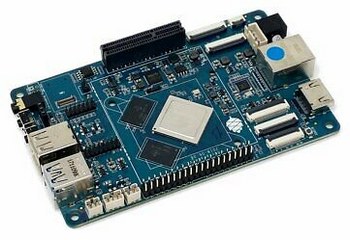
A board can boot the application perfectly and still be the wrong choice when the production SSD, second network port, and capture input are connected. That is why RK3588 vs RK3588S is primarily an interface-planning decision.
The two processors belong to the same compute family, but RK3588S removes several connectivity resources. Selecting it solely from CPU or NPU headlines can leave a product dependent on bridges, shared buses, or a board redesign.
This article explains how to review those differences before schematic approval. It uses Radxa’s published comparison and processor documentation, without claiming that every supplier board implements the same connectors.
Separate compute identity from connection topology
For an application dominated by supported CPU and accelerator workloads, either processor may be a candidate. The important question is what must remain attached while that workload runs.
Build a diagram with one box for each endpoint: storage, modem, network PHY, display, camera, USB peripheral, and recovery interface. Draw the actual connection between processor and endpoint, including hubs, switches, bridges, and shared PHYs.
A connector on the edge of a PCB does not prove an independent high-speed path. Two sockets may share an upstream USB connection. A storage slot may take lanes that another board variant assigns to a different function.
Keep the diagram next to the requirements. If a service engineer must attach diagnostic equipment during normal operation, include that device too. Hidden maintenance conflicts are easier to solve in a block diagram than after a moulded enclosure has been ordered.
PCIe is the first difference to investigate
Radxa’s comparison identifies PCIe 3.0 connectivity as an important RK3588 advantage over RK3588S. That matters when fast storage or multiple expansion devices are central to the product.
Do not stop at the PCIe generation printed in a brochure. Confirm the implemented lane width, connector wiring, reference clock, reset signals, power budget, and firmware configuration. An M.2 connector can be wired for a different interface or fewer lanes than its physical size suggests.
Check the endpoint as well. A modem, accelerator, and NVMe SSD impose different driver, power, and startup requirements. Some devices draw short current bursts that a prototype adapter hides but a compact production board must supply directly.
If storage performance drives the architecture, compare real writes and reads with the application running. The broader storage selection decision includes endurance, latency, recovery, and capacity, rather than interface speed alone.
Ethernet paths affect gateway architecture
The published comparison lists two GMAC instances on RK3588 and one on RK3588S. A supplier can still build a dual-network board around RK3588S using another controller, so two RJ45 sockets do not identify the processor’s native topology.
Ask whether each port uses a separate MAC and PHY, and identify any USB or PCIe dependency. That dependency may be acceptable, but it changes bandwidth sharing, driver ownership, and recovery behavior.
A product separating machine traffic from a management network also needs a software boundary. Two physical ports do not provide isolation unless routing, bridging, firewall rules, and application permissions implement the intended policy.
Test both ports under simultaneous traffic, link interruptions, and a remote update. A second network connection that disappears during storage activity or fails to return after a cable event is an integration defect, regardless of the headline processor specification.
Display outputs and inputs are different requirements
RK3588S reduces display and capture options relative to RK3588. In particular, the published comparison lists no HDMI receiver on RK3588S. A product ingesting an external HDMI source therefore needs a separate capture solution or a different architecture.
Distinguish a display output from a video input in every requirement and quotation. Both may use an HDMI connector, but they serve opposite directions and need different software paths.
For output, specify independent content, maximum mode, rotation, touch association, and expected behavior during hotplug. Several connector types on a board do not guarantee that all combinations can run concurrently.
For capture, define format, resolution, frame rate, audio, and synchronization requirements. Protected sources may introduce restrictions that hardware presence alone cannot solve. Validate the exact source device and approved content path before treating capture as complete.
Shared lanes can erase an apparent advantage
Both architectures require careful attention to multiplexed resources. A capability list describes available functions, while the schematic describes the combination actually chosen.
| Requirement | Question for schematic review |
|---|---|
| NVMe plus another expansion device | Which controller and lanes serve each endpoint? |
| Two wired networks | Are both native paths, or is one externally attached? |
| Multiple displays | Which simultaneous modes work on the delivered BSP? |
| HDMI capture | Is there a receiver and a working capture stack? |
| Maintenance USB | Does recovery remain available with production peripherals fitted? |
Have the supplier annotate shared resources on the block diagram and demonstrate the required combination. Save the board revision and image identifier with that demonstration.
The industrial interface checklist helps expose the non-processor details: transceivers, isolation, protection, connector retention, and cable access. Those details often determine whether a prototype can become production equipment.
Check the cost of adding missing interfaces
Review Linux device enumeration with the physical diagram open. Record the negotiated storage link, Ethernet controller identity, and USB topology on the test unit. Compare them with the quotation and schematic. This catches a common purchasing ambiguity: a connector specification that names an endpoint type without specifying the bandwidth or upstream connection that the board actually implements.
RK3588S may be an appropriate choice for a compact product with a contained interface set. The saving should be evaluated at complete board level, including any external controllers, added regulators, PCB routing, and supporting drivers.
A bridge can be a reasonable engineering solution. Its cost includes validation and future replacement, not just the component price. Add it explicitly to the BOM and software ownership list.
For a custom design, also examine package escape routing and manufacturing capability. A smaller package does not automatically produce a simpler or cheaper PCB. Ask the fabricator and assembly partner to review the proposed stackup and inspection requirements.
Approve a configuration, not a family name
The purchase specification should state the exact SoC variant, board revision, RAM, storage, connector population, and supported image. Avoid accepting a family label as evidence that the required interfaces are present.
Use a pilot configuration with every endpoint fitted. Exercise sustained traffic, storage activity, display changes, suspend or restart, and field recovery. Recheck the complete combination after firmware changes.
Choose RK3588 when its additional native connectivity avoids unacceptable constraints. Choose RK3588S when the implemented topology meets the product requirements with manageable dependencies. For compute-oriented comparisons, use the separate RK3576 vs RK3588 analysis and keep interface approval as its own gate.
Technical basis: Radxa’s RK3588 versus RK3588S comparison and the chosen board schematic. Published interface availability does not establish simultaneous operation on an unspecified board.