
NXP-Based Android SBCs for Industrial Applications
A practical engineering guide to NXP-based Android SBCs for industrial applications, covering Android system design, display and touch integration, industrial interfaces, system-level customization, power management, production testing, and remote maintenance.
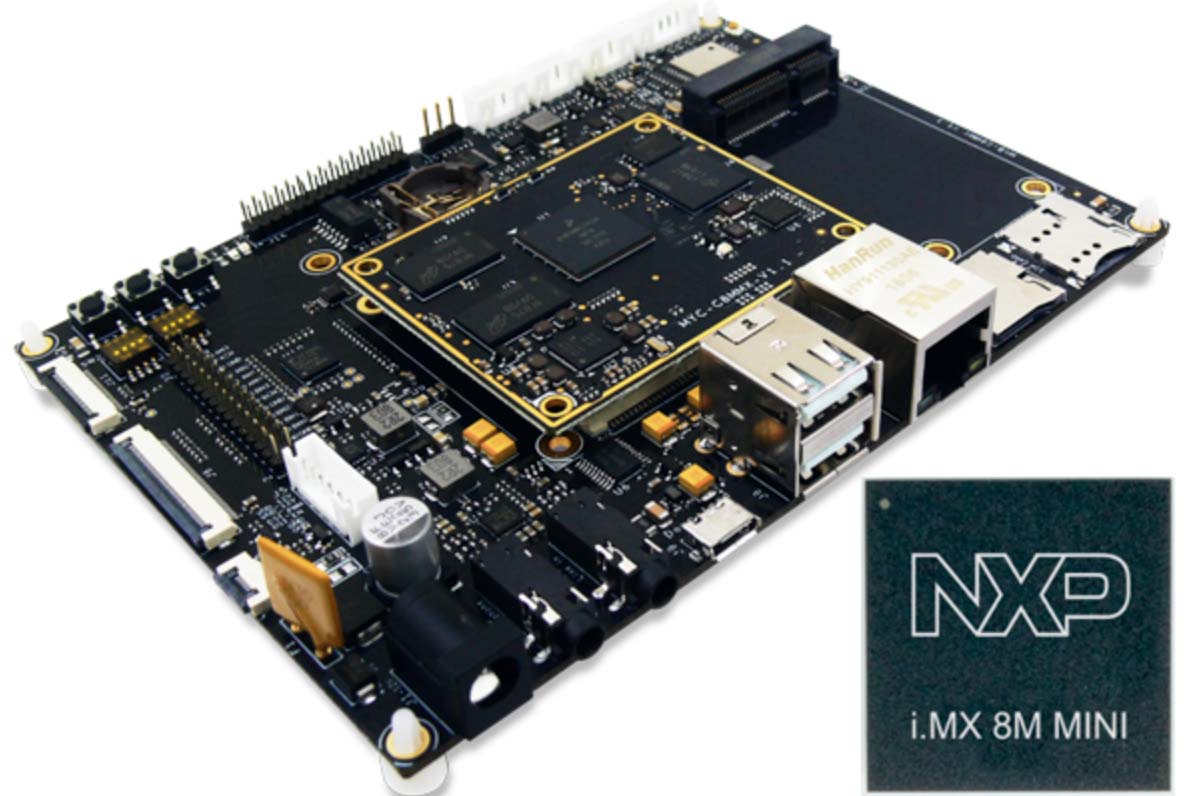
Android single-board computers are no longer limited to consumer tablets, kiosks, or simple media terminals. In many industrial projects, Android SBCs are now used as the main computing platform for HMI panels, smart terminals, equipment dashboards, medical interfaces, building automation panels, and connected control devices.
When engineers discuss Android SBCs, Rockchip, Qualcomm, MediaTek, and Allwinner are often mentioned first. However, NXP i.MX processors also have a strong position in professional embedded systems. They are widely used in Linux-based industrial products, and selected i.MX platforms can also support Android-based applications where a modern user interface, touch interaction, multimedia capability, and long-term platform stability are required.
This article looks at NXP-based Android SBCs from a practical industrial development perspective. The focus is not only on processor specifications, but also on system integration, display support, lifecycle, software maintenance, and real deployment considerations.
Why Use Android in Industrial SBC Products?
In traditional industrial systems, Linux is often the default operating system. It is lightweight, flexible, and gives engineers direct access to the kernel, device tree, drivers, and low-level interfaces. For gateways, control systems, and headless devices, Linux is still often the better choice.
However, Android becomes attractive when the product needs a strong graphical interface.
Typical Android-based industrial products include:
- Touchscreen HMI panels
- Smart building control terminals
- Medical user interface devices
- Industrial dashboards
- EV charger displays
- Retail and self-service terminals
- Equipment configuration panels
- Smart appliance control screens
- Gateway devices with local display
- Edge terminals with app-based workflows
Android provides a mature application framework. Developers can build applications using Java, Kotlin, C++, web technologies, or hybrid frameworks. The system already includes UI rendering, touch input handling, multimedia framework, networking APIs, permission management, WebView, and application lifecycle management.
For many customers, this means the application development team can work faster. They do not need to build a full graphical stack from the ground up. They can focus on the product interface, cloud connection, user workflow, and data visualization.
Why NXP for Industrial Android SBCs?
NXP i.MX processors are commonly selected in industrial embedded products because of documentation, long-lifecycle planning, Linux ecosystem, security features, and professional support channels. While many i.MX products are Linux-focused, Android support is also available on selected platforms and board designs.
For industrial projects, NXP-based SBCs are attractive for several reasons.
Long-Term Platform Thinking
Industrial products usually have a much longer lifecycle than consumer electronics. A consumer tablet may be replaced every two or three years, but an industrial HMI panel or control terminal may need to stay in production for many years.
This is where NXP is often considered. Many i.MX platforms are used in long-lifecycle products, and many module vendors build production-oriented SoMs and SBCs around them. This helps reduce redesign risk.
Strong Embedded Ecosystem
NXP i.MX platforms have broad support from hardware vendors, SoM manufacturers, BSP providers, and industrial board suppliers. For a project team, this means there are usually more reference designs, carrier boards, display examples, and production experience available.
Documentation and Hardware Transparency
In industrial products, engineers often need to debug hardware-level issues. Display bring-up, touch panel tuning, power sequencing, suspend and resume, Ethernet stability, GPIO control, and serial communication all require clear documentation.
NXP platforms are often appreciated because they are not only “application processors,” but embedded processors with a development ecosystem around hardware integration.
Security and Device Management
Industrial Android SBCs may be deployed in public or semi-public environments. For example, an HMI device may be installed in a factory, hospital, vehicle, gym, or commercial facility. Security features such as secure boot, firmware signing, partition protection, application whitelisting, and controlled update mechanisms become important.
NXP platforms are often considered in applications where security and maintainability are part of the product requirement, not just optional features.
Typical NXP i.MX Platforms for Android SBCs
Not every NXP processor is ideal for Android. Low-power processors such as i.MX6ULL are better suited to Linux. For Android-based SBCs, engineers usually look at more capable application processors.
| Platform | Typical Role in Android SBC Projects | Engineering Notes |
|---|---|---|
| i.MX6 | Legacy Android / Linux HMI | Mature but older; useful for existing systems |
| i.MX8M Mini | Mid-range Android HMI and smart terminal | Good balance for UI-based devices |
| i.MX8M Quad | Multimedia-oriented Android devices | Suitable for smart displays and media UI |
| i.MX8M Plus | Android HMI with vision or AI needs | Useful for camera, AI, and edge workloads |
| i.MX8X / i.MX8QuadXPlus | Advanced industrial / automotive-related systems | More complex architecture |
| i.MX9 Series | Newer industrial edge and secure devices | Good for new projects, but BSP maturity should be checked |
For most industrial Android SBC projects, the practical candidates are usually i.MX8M Mini, i.MX8M Quad, i.MX8M Plus, or selected i.MX9 platforms. In newer Linux-first designs, i.MX 8M Plus and i.MX 93 serve different multimedia and efficiency targets, while the i.MX 93 real-time architecture separates Linux from time-sensitive I/O. A Rockchip shortlist adds a different balance between lifecycle and Android performance.
Industrial HMI Panels
One of the most common uses of an Android SBC is an industrial HMI panel. The SBC is connected to a TFT LCD display, capacitive touch panel, Ethernet, USB, serial ports, and sometimes CAN or RS485 through additional hardware.
An Android-based HMI can show:
- Machine status
- Alarm messages
- Production data
- Parameter settings
- Maintenance pages
- User login screens
- Real-time charts
- Remote service interface
- System configuration tools
For HMI products, the display and touch experience are just as important as CPU performance. A fast processor does not solve a poor LCD interface, unstable touch panel, or weak backlight design.
Key items to check include:
- LCD interface support, such as MIPI DSI, LVDS, HDMI, or eDP
- Display timing and resolution support
- Backlight control through PWM
- Touch controller driver support
- Screen rotation
- Android density and UI scaling
- Boot logo and early display behavior
- Suspend and resume display recovery
- Long-time backlight aging behavior
In many projects, display bring-up is one of the first real engineering tasks. If the SBC vendor already provides a tested LCD and touch solution, the project risk becomes much lower.
Industrial Gateways with Local UI
Many industrial gateways are headless Linux devices, but some gateway products need a local screen. This is common in smart energy systems, building automation panels, equipment monitoring terminals, and EV charging stations.
In this type of product, the Android SBC may handle both gateway functions and user interaction.
Typical gateway functions include:
- Data collection
- MQTT communication
- HTTPS communication
- Modbus TCP
- Modbus RTU through RS485
- CAN communication through external controller
- Local database storage
- Cloud synchronization
- Remote configuration
- Device status display
Android is useful when the gateway needs a clear local dashboard. Operators can view connection status, device list, sensor values, alarm logs, and system settings directly on the screen.
However, engineers should be careful with real-time control. Android is not a hard real-time system. If the product needs deterministic control, safety logic, or motion control, these functions should usually be handled by a dedicated MCU, PLC, or controller board. The Android SBC is better used for interface, communication, supervision, and data management.
Medical and Laboratory Interfaces
NXP-based Android SBCs can also be used in medical and laboratory equipment interfaces. In these applications, Android is often chosen because it provides a familiar touch interface and supports modern UI development.
Possible applications include:
- Diagnostic equipment interfaces
- Patient-side terminals
- Laboratory instrument panels
- Medical cart displays
- Imaging control terminals
- Data entry and result display devices
For medical and laboratory products, the display must be stable and easy to read. Touch reliability, cleaning resistance, long-term availability, and controlled firmware updates are important.
Engineers should also consider:
- EMI performance
- Power stability
- Long operating hours
- Touch performance with gloves
- Enclosure sealing
- Display brightness
- Color consistency
- Data security
- Update control
NXP platforms are often considered here because the project usually needs a long lifecycle and stable hardware supply.
Android Without Google Services
A common issue in industrial Android automation projects is GMS. Many custom Android boards are based on AOSP and do not include Google Mobile Services, Google Play Store, or Google Play Services.
This is important because some applications assume Google services are available. For example, maps, push notifications, Google account login, Play Store updates, or certain location APIs may not work the same way on a non-GMS firmware.
Before starting development, engineers should ask:
- Is GMS required?
- Does the customer need Google Play Store?
- Does the application depend on Google Play Services?
- Can APKs be pre-installed at the factory?
- Is an MDM or third-party app store required?
- Can updates be handled through a private OTA system?
- Is microG or another compatibility layer being considered?
- Are there licensing or certification limitations?
For industrial devices, it is often better to design the system without depending on Google services unless GMS certification is clearly planned. Applications can be pre-installed, updated through a private server, or managed through an MDM solution.
System-Privileged Applications
Industrial Android devices often need more control than a normal consumer app. For example, the application may need to:
- Control screen brightness
- Set dark mode
- Lock orientation
- Start automatically after boot
- Enable kiosk mode
- Manage Wi-Fi settings
- Hide system navigation
- Disable unwanted system apps
- Access serial ports
- Communicate with GPIO or MCU services
- Enable accessibility-related functions
Some of these functions cannot be done by a normal APK. The common engineering solution is to install the customer application as a system-privileged app, sign it with the platform key, or provide a custom system service.
This should be discussed early, because it affects firmware signing, OTA updates, application permissions, and security design.
A typical production approach may include:
- Customer APK pre-installed in /system/priv-app or /product/priv-app
- Platform key signing if required
- Custom permission whitelist
- Device Owner or MDM setup
- Boot receiver enabled
- Kiosk launcher configuration
- Controlled OTA update method
This is usually more suitable than giving root access in production. Root may be useful during development, but it is not a good default for deployed industrial devices.
Hardware Interfaces in Industrial Applications
An Android SBC for industrial use usually needs more than display and touch. Interface design is often the difference between a development board and a real product platform.
Common interface requirements include:
- Ethernet
- Wi-Fi and Bluetooth
- USB host
- USB device
- RS485
- RS232
- CAN
- GPIO
- I2C
- SPI
- Audio
- Camera
- 4G or LTE module
- GPS or GNSS
- External MCU connection
- RTC
- Watchdog
NXP-based SBCs can support many of these interfaces depending on the exact processor and carrier board design. However, the Android framework does not expose every low-level interface directly. Serial ports, GPIO, CAN, and RS485 may require native libraries, custom system services, JNI interfaces, or vendor APIs.
This is why the BSP and SDK matter. A good industrial Android SBC should not only boot Android. It should also provide a practical way for the application team to access board-level functions.
Power Management and Reliability
Industrial Android devices may run continuously for long periods. Power management is not only about battery life. It also affects temperature, product lifetime, stability, and energy compliance.
Important topics include:
- Screen-off standby
- Deep standby
- Wake-up sources
- RTC wake-up
- GPIO wake-up
- Power key behavior
- Backlight power control
- Ethernet PHY power control
- Wi-Fi and Bluetooth power states
- Suspend and resume stability
- Application recovery after reboot
- Watchdog behavior
For a touchscreen HMI, the display and backlight are often major power consumers. In standby mode, turning off the LCD, backlight, touch, Ethernet PHY, USB hub, audio amplifier, and wireless module can significantly reduce system power.
If the product has a strict standby requirement, such as 0.1W class deep standby, this must be considered in the hardware design. It cannot be solved only by Android settings after the board is already designed.
Production Testing
A production-ready Android SBC should include factory test tools. These tools are often more important than they appear during early development.
Factory tests may include:
- LCD display test
- Touch test
- Backlight test
- Audio test
- Ethernet test
- Wi-Fi test
- Bluetooth test
- USB test
- GPIO test
- RS485 or RS232 loopback
- Camera test
- eMMC test
- RTC test
- Aging test
- Firmware version check
- SN writing
- MAC address verification
For industrial products, the factory process should write and verify device identifiers such as serial number, MAC address, hardware version, and firmware version. These identifiers are useful later for deployment, after-sales service, and remote troubleshooting.
Deployment and Remote Maintenance
Once an Android SBC is installed in the field, maintenance becomes more difficult. A good system should support remote diagnostics and update management.
Useful information to report from the device includes:
- Device SN
- Hardware version
- Firmware version
- App version
- IP address
- Wi-Fi SSID
- Ethernet status
- Uptime
- Storage usage
- Temperature if available
- Crash logs
- Last online time
- Deployment site ID
This is often more useful than adding hardware GPS for fixed equipment. If the device is installed in a known factory, gym, hospital, or building, it can be registered by serial number and site code. The application can then bind the device to a customer, location, and project configuration during first setup.
For many industrial products, SN-based registration plus network diagnostics is simpler, cheaper, and more reliable than adding a GNSS module and antenna.
Choosing the Right NXP-Based Android SBC
When selecting an NXP Android SBC for an industrial project, engineers should look beyond the processor name.
Key questions include:
- Which Android version is supported?
- Is the BSP stable enough for production?
- Is the required display interface already supported?
- Is the touch panel driver available?
- Are serial, CAN, RS485, or GPIO APIs provided?
- Is GMS required or not?
- Can customer APKs be pre-installed?
- Can the customer app run as a system-privileged app?
- Is OTA supported?
- What is the operating temperature range?
- Is the board available for long-term supply?
- Are factory test tools available?
- Is customization possible for the carrier board?
- Can the vendor support display, touch, enclosure, and firmware together?
A board that looks good in a demo may still need a lot of work before it becomes a production-ready industrial device. The most reliable choice is usually a platform that has already been validated with similar display, touch, power, and interface requirements. That makes board supplier qualification as important as processor selection.
Conclusion
NXP-based Android SBCs can be a strong choice for industrial products that need a stable embedded platform with a modern touch interface. They are especially useful in HMI panels, smart terminals, medical equipment, industrial gateways with local UI, and building automation panels.
The main value of an NXP Android SBC is not only the processor itself. It is the combination of hardware design, display integration, BSP support, power management, system-level permissions, production testing, and long-term maintainability.
For engineering teams, the key is to define the product clearly before selecting the platform. If the device needs a touchscreen UI, stable Android firmware, industrial interfaces, remote maintenance, and long-term supply, an NXP-based Android SBC can provide a practical foundation. But the success of the project depends on careful integration work, not just the SoC specification.
A good industrial Android SBC should boot reliably, drive the display correctly, expose the required interfaces to applications, support controlled updates, pass factory testing, and remain stable in the field. That is what turns a development board into a real industrial product.
Frequently Asked Questions
Can NXP i.MX processors run Android SBC products?
Yes. Selected NXP i.MX platforms can be used in Android SBC products, especially where industrial lifecycle, security, display support, and professional embedded documentation are important.
Why choose NXP for industrial Android SBCs?
NXP is often considered for industrial projects because of long-term platform planning, mature Linux ecosystem, security features, documentation, and support for professional embedded products.
Are NXP Android SBCs better than Rockchip Android SBCs?
Neither is always better. NXP is attractive for long-lifecycle industrial products, while Rockchip often provides strong multimedia performance and cost efficiency. The best choice depends on product requirements.
What industrial applications use NXP-based Android SBCs?
Typical applications include HMI panels, building automation terminals, medical interfaces, smart gateways, industrial dashboards, EV charger screens, and connected control devices with local displays.
What should be checked before selecting an NXP Android SBC?
Engineers should check Android BSP maturity, display and touch support, interface access, power management, thermal design, update strategy, production testing, and long-term component availability.