
CAN Bus on Android SBCs: A Practical Guide for Industrial Engineers
Learn how to integrate CAN Bus with Android SBCs for industrial applications. Covers native SoC vs. external controllers, SocketCAN setup, Android HAL implementation, SoC comparison, and physical layer design considerations.
Most teams that bring CAN Bus into an Android SBC project run into the same wall: Linux handles CAN cleanly through SocketCAN, Android does not. The kernel driver works fine. The interface comes up. But getting CAN frames into a Java or Kotlin application requires bridging a gap between the Linux kernel and the Android permission model — and your SBC vendor’s BSP may or may not have done that work for you.
This article covers the full path: hardware interface selection, Linux SocketCAN configuration, how to handle the Android application layer, SoC selection, and physical layer details that matter in field installations. Products combining CAN, RS485, and Ethernet need those decisions before the carrier board is finalized.
Why CAN Bus Still Dominates Industrial Communication
CAN Bus was designed in the 1980s for automotive wiring. Forty years later it still appears in factory automation, medical equipment, EV charging stations, AGVs, and building management systems. The reason is not inertia — it is that CAN genuinely fits the conditions these industries create.
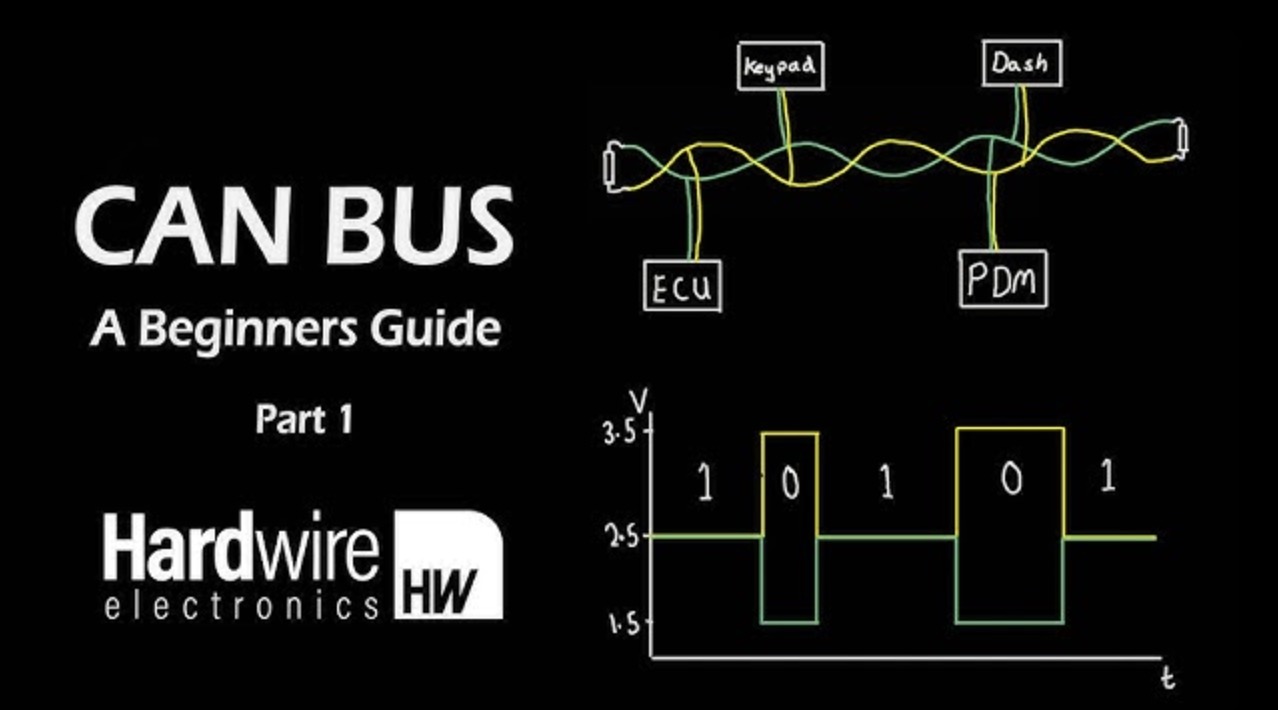
Differential signaling over a twisted pair gives strong noise immunity in environments with variable-frequency drives, welding equipment, and high-current switching loads. The bus topology requires no managed switch, no IP addressing, and no routing table. Error detection and automatic retransmission are built into the protocol. Cable runs of 40 meters at 1 Mbps are practical; at 125 kbps, you can go well past 500 meters.
Higher-layer protocols built on CAN — CANopen for industrial automation, SAE J1939 for heavy vehicles, DeviceNet for factory I/O — have decades of installed base. When your Android HMI needs to talk to a motor drive, a PLC, or a sensor node, the question is usually not whether to use CAN but how to connect your board to it.
Hardware Interface Options
There are three practical ways to add CAN Bus to an SBC project. Each involves different trade-offs in cost, PCB complexity, and maximum throughput.
| Approach | Typical Hardware | Max Speed | Integration Effort | Notes |
|---|---|---|---|---|
| Native SoC CAN controller | RK3568, RK3588, i.MX6, i.MX8M | CAN FD up to 8 Mbps | Low (device tree config) | Best for production; no extra BOM cost |
| SPI CAN controller | MCP2515 / MCP25625 | Classic CAN, 1 Mbps | Medium (SPI wiring + driver) | Easy to add to boards without native CAN; SPI latency limits real-time performance |
| USB-to-CAN adapter | Peak PCAN-USB, Kvaser Leaf, GS_USB-compatible devices | 1 Mbps / CAN FD variants | Low for prototyping | Adds external hardware; good for dev work and retrofits, not clean for production |
For a product that ships in volume, native SoC CAN is the right choice if the SoC supports it. External options are useful during prototyping or when adding CAN to an existing board design that was not originally planned for it. An SPI-connected MCP2515 works, but the SPI bus scheduling adds latency that matters if you are processing high-frequency CAN messages — above roughly 2000 frames per second you will start to see issues on a shared SPI bus.
Linux and SocketCAN
Linux has had a clean CAN Bus interface since kernel 2.6.25. SocketCAN exposes CAN controllers as standard network interfaces — can0, can1, etc. — and allows userspace programs to communicate using the standard BSD socket API. If you have worked with Ethernet sockets in Linux, the programming model transfers directly.
Bringing up a CAN interface at 500 kbps:
ip link set can0 type can bitrate 500000
ip link set can0 up
From there, can-utils covers most verification needs:
candump can0                    # monitor all incoming frames
cansend can0 123#DEADBEEF       # send a frame with ID 0x123
cangen can0 -g 5 -I 200         # generate test traffic
This works on any ARM Linux distribution with the relevant driver compiled in. Most of the BSP work is in the device tree: configuring the CAN controller node, assigning the correct clock source, setting the interrupt, and adding the GPIO that controls the transceiver’s standby pin. On boards where this is already done correctly, you have a working can0 interface immediately after boot.
For CAN FD, the configuration adds a data bitrate:
ip link set can0 type can bitrate 500000 dbitrate 2000000 fd on
ip link set can0 up
If your SoC supports CAN FD (RK3568 and RK3588 both do; i.MX8M Plus does), and your transceivers are CAN FD-capable, this is all that is required at the Linux level.
The Android Layer: Where Most Projects Stall
Android and Linux share the same kernel on these SBCs. The CAN controller driver is there. The SocketCAN interface comes up normally. But Android’s permission model does not expose raw PF_CAN socket access to regular applications. An app cannot simply open a CAN socket the way a Linux process would. This is not a hardware or driver problem — it is an Android framework boundary.
There are three practical approaches for bridging this gap:
Option 1: NDK native code with system-level permissions
A native C/C++ library opened via Android NDK can create a PF_CAN socket directly. This works, but requires the application to be signed as a system app or granted elevated permissions in the platform’s SELinux policy. For an OEM product where you control the complete Android image and system partition, this is a reasonable path. For an application intended to run on arbitrary Android devices, it is not viable.
Option 2: A custom Android HAL service
The cleaner production architecture is a system service at the Android HAL layer that owns the CAN socket, reads frames, and exposes them to applications through AIDL. Applications bind to the service and receive CAN data through a defined interface. This separates the privileged system code from the application code cleanly, and it is the approach NXP’s BSP documentation points toward for their FlexCAN-based platforms.
The engineering investment is two to four weeks for a developer familiar with Android system services. The result is an architecture that survives OTA updates and can be maintained without touching the application layer.
Option 3: USB-CAN adapter as a USB serial device
Some teams bypass the SocketCAN problem entirely by using a USB-to-CAN adapter that enumerates as a USB CDC ACM device (virtual serial port). Android’s USB host stack handles CDC ACM devices without special permissions, and libraries like usb-serial-for-android make the programming straightforward. The application reads and writes CAN frames through the serial connection using whatever framing protocol the adapter exposes.
This avoids all HAL work and produces a working prototype quickly. The cost is external hardware, a dependency on the adapter vendor’s framing protocol, and a USB port consumed. For field deployments this can be acceptable; for sealed industrial products with a fixed CAN channel count, it usually is not.
SoC Selection for CAN Bus Projects
| SoC | CAN Channels | CAN FD | Mainline Kernel Driver | Android BSP CAN Notes |
|---|---|---|---|---|
| NXP i.MX6 Quad/Dual | 2 | No | FlexCAN — very mature | HAL example available in NXP BSP; widely deployed |
| NXP i.MX8M Plus | 2 | Yes | FlexCAN — mature | HAL example available; stronger compute for AI/vision |
| Rockchip RK3568 | 2 | Yes | In-tree since 5.10 | SocketCAN driver solid; Android HAL needs custom work |
| Rockchip RK3588 | 3 | Yes | In-tree since 5.10 | Same situation as RK3568; more channels useful for gateways |
| Allwinner H616 / H618 | None | — | N/A | External SPI CAN chip required for any CAN application |
NXP has the strongest CAN heritage here. The FlexCAN controller in i.MX6 and i.MX8 series comes from NXP’s automotive background and has been in production embedded systems for over a decade. The mainline driver is stable under high frame rates, and NXP’s BSP documentation covers Android CAN integration at the system service level.
Rockchip RK3568 is the more practical choice for most Android HMI and gateway products in 2024-2025 because of ecosystem breadth and Android BSP maturity. The CAN FD driver works. If your team is comfortable writing Android system services, the CAN integration is achievable. If your team is not — ask your board supplier directly whether they have done it, and ask for a demo.
Allwinner is a non-starter for CAN-primary products. Plan for MCP2515 over SPI if you are committed to an Allwinner-based platform.
Physical Layer: Transceivers and Isolation
The SoC CAN controller outputs digital TX/RX signals at 3.3V logic levels. These cannot drive a CAN bus directly — you need a CAN transceiver between the SoC and the cable.
Common transceiver choices:
- TJA1050 / TJA1051 (NXP): 5V or 3.3V versions, high-speed, widely used in industrial designs
- SN65HVD230 (Texas Instruments): 3.3V, low-power, common on development boards
- TCAN1042 (TI): CAN FD-capable, 5 Mbps, suitable when upgrading to CAN FD networks
For industrial environments, add galvanic isolation between the transceiver and the cable. Ground loops are common in factory panels where the CAN cable runs between equipment with different earth potentials. An unprotected board can be damaged by transient voltages that exceed the transceiver’s common-mode range. Isolated CAN transceivers — the ISO1050 from TI, or discrete optocoupler plus transceiver — add $3–8 per channel to BOM cost. That is cheap compared to a field return.
For connector selection: DB9 is the standard for industrial CAN wiring in most markets. 3.81mm or 5.08mm spring-cage terminal blocks are used in DIN rail installations where cable-side connectors are not practical. Match the connector to how installers in your target application normally wire equipment — it affects product acceptance more than engineers typically expect.
What to Confirm Before Committing to a Platform
Before placing a sample order for an SBC intended for CAN Bus integration, get specific answers to these questions:
- Can they demonstrate SocketCAN working? Ask for
candumpoutput on the actual hardware, not a screenshot from a datasheet. - For Android builds: do they have an existing HAL service or CAN example application? A supplier who has shipped Android CAN products can demonstrate something concrete. One who has not will say “we can evaluate that” — which often means you are funding their first attempt.
- What transceiver is on the board? Verify it matches your speed and isolation requirements.
- Which kernel version, and is the CAN driver in-tree or out-of-tree? Out-of-tree drivers create long-term maintenance risk.
- Has CAN FD been validated at your required data bitrate? The driver may exist but not have been tested at 2 Mbps or above.
A supplier who cannot answer questions 1 and 2 with specific evidence — not marketing language — is one that warrants more due diligence before a design commitment.
Making the Decision
On Linux, CAN Bus integration on a well-chosen SBC is a few days of work at most. The tooling is mature, the kernel subsystem is stable, and most problems reduce to device tree configuration.
On Android, the hardware side is identical, but allocate real engineering time for the system layer. If your BSP supplier has already done Android CAN integration and can hand you a working HAL service, the application development timeline is similar to Linux. If they have not, plan two to four weeks of system-level Android work before your application developer can write a single line of Kotlin.
The SoC model matters less than the BSP. An RK3568 board from a supplier with five shipped CAN Bus products will be faster to integrate than an i.MX8M Plus board from a supplier doing it for the first time. When you evaluate platforms, evaluate the supplier’s integration experience alongside the chip specifications.
Frequently Asked Questions
Can Android SBCs support CAN Bus?
Yes. Android SBCs can support CAN Bus when the Linux kernel and hardware provide a CAN controller or an external CAN interface. Application access usually requires a system service, native layer, HAL, or vendor SDK.
What is SocketCAN?
SocketCAN is the Linux kernel framework that exposes CAN Bus interfaces like network devices. It allows CAN frames to be sent and received through standard socket-style APIs on Linux.
Why is CAN Bus harder on Android than on Linux?
Android uses the Linux kernel, but normal Android apps do not usually have direct access to raw CAN sockets. Production systems often need privileged services or HAL integration to bridge CAN data into applications.
Which CAN hardware option is best for production?
A native SoC CAN controller is usually best for production because it reduces external hardware and integrates cleanly with the kernel. SPI or USB CAN adapters are useful for prototyping or retrofits.
What should engineers ask before selecting an Android SBC for CAN Bus?
They should ask whether the board has native CAN, whether SocketCAN is enabled, how Android apps access CAN frames, whether examples are provided, and how the physical CAN transceiver is protected.