
Android SBC for HMI: Building Smart Human-Machine Interface Solutions
A complete guide to Android SBC for HMI applications, covering Android-based human-machine interface design, display and touch integration, industrial communication, software customization, and production-ready hardware selection.
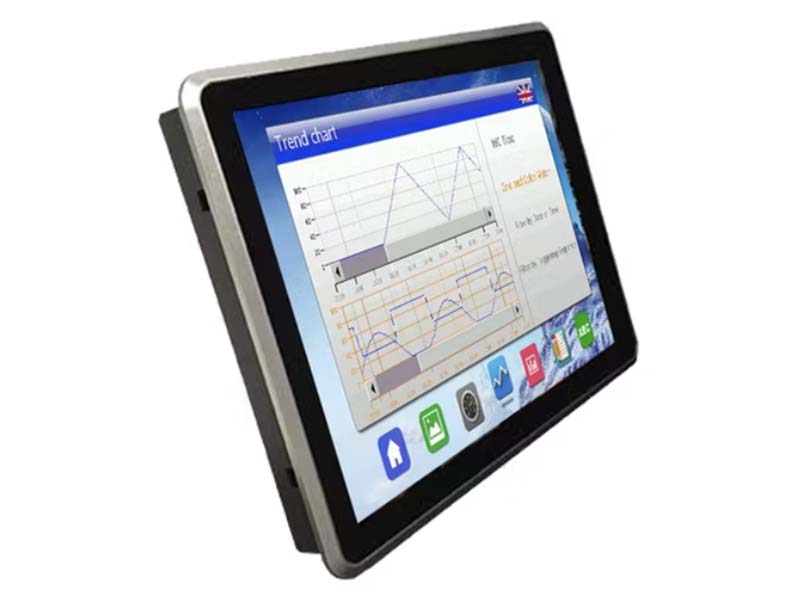
Human-Machine Interface, usually shortened to HMI, has become an essential part of modern industrial equipment, smart home systems, medical devices, commercial terminals, and automation products. In the past, many HMI products were built around traditional microcontroller platforms or dedicated industrial panel PC architectures. These systems were reliable, but they were often limited in user interface design, network connectivity, software flexibility, and multimedia performance.
Today, an Android SBC for HMI offers a more flexible and modern approach. By combining an ARM-based single-board computer with the Android operating system, product developers can build rich graphical interfaces, support touch interaction, integrate cloud services, connect with industrial devices, and shorten software development cycles. For many embedded products, Android SBCs provide a practical bridge between consumer-style user experience and industrial-grade hardware integration.
This article explains what an Android SBC for HMI is, why it is useful, how it compares with Linux-based HMI solutions, and what engineers should consider when selecting a platform for real products.
What Is an Android SBC for HMI?
An Android SBC for HMI is a single-board computer designed to run Android and act as the control and display platform for a human-machine interface. It usually integrates a processor, memory, storage, display output, touch interface, audio, wireless communication, Ethernet, USB, serial ports, GPIO, and other expansion interfaces on one compact board.
In an HMI system, the SBC is typically connected to a TFT LCD display, capacitive touch panel, power supply, enclosure, and external control devices. The Android system provides the graphical operating environment, while the application software presents menus, dashboards, alarms, settings, control buttons, data visualization, and communication functions.
Common HMI applications include:
- Industrial control panels
- Smart home control panels
- Building automation terminals
- Medical device interfaces
- EV charger screens
- POS terminals
- Access control panels
- Energy management systems
- Kitchen appliance displays
- Factory test equipment
- IoT gateways with local display
Compared with a simple display module, an Android SBC is not only responsible for showing information. It can also process user input, communicate with sensors or controllers, run local applications, connect to cloud platforms, play audio or video, and manage system updates.
Why Android Is Suitable for HMI Applications
Android is widely known as a mobile operating system, but it has also become common in embedded HMI products. The reason is simple: many modern devices now require a user experience similar to smartphones or tablets. Users expect smooth touch response, clear icons, animated menus, multilingual UI, network features, and easy configuration.
Android provides several advantages for HMI development.
First, Android has a mature graphical framework. Developers can build attractive interfaces using Java, Kotlin, native C++, or cross-platform frameworks. Compared with low-level GUI development on bare-metal systems, Android makes it easier to create complex screens, animations, dialogs, and interactive controls.
Second, Android has strong multimedia support. Many HMI products need video playback, audio output, camera preview, QR code scanning, voice prompts, or image processing. Android already includes many APIs and system services for these functions, which can reduce development effort.
Third, Android supports modern connectivity. Wi-Fi, Bluetooth, Ethernet, USB, and cellular modules can be integrated into an Android-based device. This is especially useful for smart home panels, building automation systems, retail terminals, and cloud-connected industrial equipment.
Fourth, Android has a large developer ecosystem. Many software engineers are already familiar with Android application development. This makes it easier for companies to build, update, and maintain HMI software compared with some specialized embedded GUI environments.
Finally, Android supports application-level deployment. Instead of rebuilding the whole firmware for every interface update, many changes can be delivered through APK updates. For commercial products with frequent UI or feature changes, this can be a major advantage.
Typical Hardware Architecture
A typical Android SBC for HMI includes several key hardware blocks.
The processor is usually an ARM-based SoC, such as a Rockchip, Allwinner, NXP, or similar embedded platform. The SoC integrates CPU cores, GPU, display controller, video engine, memory controller, and peripheral interfaces. For HMI applications, the GPU and display controller are especially important because they directly affect UI smoothness and screen compatibility.
The required Android RAM capacity depends on the production BSP and concurrent workload. A constrained interface may fit in 2GB, while WebView content, camera buffers, diagnostics, and background services can justify evaluating 4GB or more. Test the busiest operating sequence rather than selecting memory from the idle application alone.
Managed embedded flash storage commonly uses eMMC or, on compatible platforms, UFS; PCIe NVMe is another option where the board and boot chain support it. Reliability depends on the exact device, workload, and power-loss behavior rather than the interface name. Capacity must cover the OS, applications, logs, update workflow, user data, and future expansion.
The display interface depends on the screen size and resolution. Common interfaces include RGB, LVDS, MIPI DSI, and HDMI. For compact HMI products, MIPI DSI and RGB are common. For larger industrial displays, LVDS or HDMI may be used. The SBC should match the display resolution, timing, voltage level, and connector design.
Touch input is usually handled by a capacitive touch controller through I2C or USB. In many HMI products, capacitive touch is preferred because it provides a smartphone-like experience. However, for harsh industrial environments, designers may also need glove support, water rejection, thicker cover glass, or anti-interference tuning.
Other interfaces may include RS232, RS485, CAN, GPIO, relay control, ADC, audio amplifier output, camera interface, Ethernet, USB host, USB OTG, and wireless modules. The exact interface requirements depend on the final product.
Android SBC and Display Integration
Display integration is one of the most important parts of an HMI project. A good Android SBC is not only a computing board; it must also work reliably with the selected LCD, touch controller, and firmware before the enclosure is finalized.
For example, a 7-inch HMI panel may use a 1024×600 or 1280×800 TFT LCD with capacitive touch. The SBC must support the correct display interface, backlight control, power sequencing, touch controller driver, and mechanical connection. If the display requires special timing or initialization commands, the Android kernel and device tree may need to be modified.
Backlight control is also important. Many HMI products need automatic brightness adjustment, sleep mode, screen timeout, or power-saving behavior. In industrial or medical applications, the screen may need to remain stable for long periods without flicker or unexpected blanking.
Touch integration requires careful driver support and calibration. A capacitive touch panel must be properly matched with the cover glass, enclosure, grounding design, and electrical environment. In some applications, noise from power supplies, motors, relays, or long cables can affect touch stability. Therefore, both hardware layout and software driver configuration matter.
For outdoor or semi-outdoor HMI products, optical bonding, high-brightness backlight, anti-glare surface treatment, and wide viewing angle IPS panels may be required. These display-level decisions should be considered together with the Android SBC, not after the board design is finished.
Android SBC vs Linux SBC for HMI
Both Android and Linux SBCs can be used for HMI development. The best choice depends on the product requirements.
Android is usually better when the product needs a modern touch interface, app-style development, multimedia functions, Wi-Fi or Bluetooth configuration, cloud connection, and frequent UI updates. It is also useful when the application team already has Android developers.
Linux is often better when the product requires long-term system control, lightweight boot process, direct hardware access, simple GUI frameworks, or strict customization at the system level. Linux-based HMIs are common in industrial automation, where the interface may be built with Qt, LVGL, GTK, or a browser-based frontend.
The difference is not that one system is always better than the other. Android provides a stronger application ecosystem and user experience, while Linux provides more direct control and lower system overhead. For an HMI product with rich graphics, user accounts, multimedia, wireless setup, and OTA updates, Android can be very attractive. For a machine controller with simple screens, strict timing, and limited resources, Linux may be more appropriate.
In many real projects, the choice depends on software team capability. If the team can develop Android apps efficiently, an Android SBC can reduce UI development time. If the team is experienced in embedded Linux and Qt, a Linux SBC may provide better control.
Software Development Considerations
Developing an Android HMI product is different from developing a normal Android phone app. The device is usually dedicated to one application, and the user should not interact with the system like a consumer tablet.
A typical Android HMI product may require kiosk mode, auto-start application, disabled system navigation, customized boot logo, hidden status bar, controlled settings access, and restricted user permissions. The system should boot directly into the HMI application and prevent accidental exit.
The application should also be designed for long-term operation. Industrial and commercial HMI devices may run continuously for months or years. Memory leaks, background service failures, excessive logging, storage wear, and unstable network reconnection can all cause field problems.
For communication with external devices, the Android app may need access to UART, RS485, CAN, USB, GPIO, or Ethernet protocols. Standard Android APIs do not always expose these interfaces directly, so vendors usually provide SDKs, native libraries, JNI interfaces, or system services. Before selecting an Android SBC, engineers should confirm how the required hardware interfaces are accessed from the application layer.
OTA update is another important feature. Android supports different update models, including full firmware update, incremental update, and application-level update. For commercial products installed in the field, a reliable update strategy is critical. The device should be able to recover from failed updates and avoid bricking due to power loss or network interruption.
Performance Requirements for Android HMI
Performance requirements vary widely depending on the HMI design. A simple control panel with static buttons and basic settings may run well on an entry-level quad-core ARM processor. A more advanced HMI with animations, video playback, browser components, data charts, and multiple services may require a stronger SoC.
The key performance factors include CPU, GPU, RAM, storage speed, display resolution, and thermal design.
The CPU affects application logic, communication processing, background services, and system responsiveness. The GPU affects animation smoothness, screen transitions, and graphical rendering. RAM affects multitasking and long-term stability. Storage speed affects boot time, app launch time, logging, and updates.
Resolution also has a major impact. Driving a 1280×800 display requires more resources than driving an 800×480 display. If the HMI uses high-resolution images, complex animations, or web-based UI, hardware selection must include enough performance margin.
Many HMI panels are installed inside sealed enclosures or walls. Their fanless SBC cooling depends on power consumption, PCB layout, heat spreading, enclosure materials, and the actual installation. Validate sustained performance as well as temperature: a board that avoids overheating by throttling may still miss the application’s response-time requirement.
Connectivity and Industrial Communication
An HMI rarely works alone. It usually communicates with controllers, sensors, cloud servers, mobile apps, or management platforms.
For industrial systems, RS485 is widely used for Modbus communication. CAN may be used in energy systems, vehicles, and industrial control. Ethernet is common for stable network communication. Wi-Fi is useful when cabling is difficult, especially in smart home and commercial applications. Bluetooth may be used for local setup, device pairing, or mobile interaction.
An Android SBC for HMI should provide the required physical interfaces and stable driver support. It is not enough to check whether the connector exists. Engineers should verify communication reliability, driver maturity, API access, ESD protection, isolation requirements, and long-term operation under real field conditions.
For smart home and building automation, the HMI may need to connect with KNX, Zigbee, Matter, MQTT, or other control systems through gateway modules. In this case, the Android SBC may act as both a user interface and an edge gateway.
For cloud-connected products, the system may need HTTPS, MQTT, WebSocket, device authentication, remote configuration, and secure OTA updates. Android provides many useful network APIs, but security design must still be planned carefully.
Mechanical and Product Design
An Android HMI may use an integrated panel PC or separate SBC, but either route becomes part of a complete product rather than a standalone development board. Mechanical design, display fitting, touch panel bonding, connector placement, cable routing, heat dissipation, and mounting method all affect the final result.
For wall-mounted HMI panels, thickness is often a major concern. The SBC, LCD, touch panel, back cover, power board, speaker, antenna, and connectors must fit inside a compact enclosure. If PoE, relay output, or industrial terminal blocks are required, the mechanical design becomes more complex.
For industrial equipment, the enclosure may need front-panel sealing, screw mounting, metal frame support, ESD protection, and vibration resistance. For medical or commercial terminals, the surface design may need to support easy cleaning, anti-fingerprint coating, or stronger cover glass.
A good Android SBC supplier should be able to support not only the board but also the display, touch panel, cable, mechanical structure, and firmware adaptation. This is especially important for companies that want to move from prototype to mass production.
Reliability and Long-Term Supply
HMI products often have long product lifecycles. Industrial and commercial customers may expect the same product to remain available for many years. Therefore, long-term supply is a key factor when selecting an Android SBC.
Engineers should evaluate the availability of the SoC, memory, power ICs, wireless modules, connectors, and display components. If a key component becomes unavailable, the product may require redesign, recertification, and software modification.
Software maintenance is equally important. Android versions change over time, and vendor BSP support may vary. For embedded HMI products, stability is often more important than using the newest Android version. A well-tested Android 11, Android 12, or Android 13 platform may be more suitable than a newer but less mature system.
The supplier should provide kernel source code, device tree files, Android build environment, flashing tools, driver documentation, and technical support. Without these resources, even a powerful SBC can become difficult to customize.
Security Considerations
Security is becoming increasingly important for HMI devices, especially when they connect to local networks or cloud platforms. An Android HMI may contain user data, configuration files, device credentials, network passwords, and control permissions.
Basic security measures include disabling unnecessary services, limiting debug access, protecting firmware images, using secure communication protocols, controlling application permissions, and supporting secure OTA updates. For devices installed in public areas, USB access and system settings should also be restricted.
In industrial environments, security is not only about data protection. A compromised HMI could affect equipment operation or building control systems. Therefore, authentication, access control, audit logs, and network isolation should be considered during product design.
How to Select an Android SBC for HMI
When selecting an Android SBC for HMI, engineers should not only compare CPU frequency or RAM size. The board must match the full product requirement.
Important selection factors include:
- Android version and BSP maturity
- Display interface compatibility
- Touch panel driver support
- CPU and GPU performance
- RAM and eMMC capacity
- Boot time and system stability
- RS485, CAN, UART, GPIO, USB, and Ethernet support
- Wi-Fi and Bluetooth performance
- OTA update method
- Power input range
- Thermal performance
- Long-term component supply
- Mechanical size and connector location
- Custom firmware support
- Certification and production support
For mass production, it is also important to confirm whether the supplier can provide consistent hardware revisions, test fixtures, production firmware flashing, serial number management, MAC address programming, and quality control procedures.
A development board may be good for evaluation, but a production-ready Android SBC must be stable, maintainable, and well documented. An industrial HMI board shortlist should connect screen, enclosure, I/O, and BSP requirements before hardware is locked.
Common Challenges in Android HMI Projects
Although Android SBCs are powerful, real projects can still face challenges.
One common issue is boot time. Android usually takes longer to boot than a lightweight Linux system or microcontroller platform. Engineers may need to optimize startup services, boot animation, application launch sequence, and system configuration.
Another challenge is system customization. Many HMI products require removing unnecessary Android features, locking the device into one application, changing system UI behavior, and controlling settings access. This requires BSP-level experience, not just app development skills.
Driver adaptation can also be a challenge. Display timing, touch controller support, GPIO control, serial communication, and power management may require kernel or HAL modifications. Choosing a supplier with strong Android BSP support can reduce project risk.
Long-term stability must be tested carefully. An HMI may work well during a short demo but fail after weeks of continuous operation due to memory leaks, log growth, network reconnection bugs, or storage problems. Aging tests and field simulation are necessary before mass production.
Conclusion
An Android SBC for HMI is a powerful platform for building modern, touch-based, connected, and visually rich embedded products. It combines ARM hardware, Android software, display integration, touch interaction, and communication interfaces into a flexible solution suitable for many industries.
For smart home panels, industrial control terminals, medical interfaces, EV chargers, retail devices, and IoT gateways, Android SBCs can shorten development time and provide a user experience that is closer to modern consumer electronics. At the same time, successful HMI development requires careful attention to display compatibility, touch performance, system customization, thermal design, communication reliability, security, and long-term supply.
The best Android SBC is not simply the board with the highest specifications. It is the platform that matches the product’s screen, enclosure, interface, software, production, and lifecycle requirements. For companies developing professional HMI products, choosing the right Android SBC early can reduce engineering risk, improve user experience, and make the path from prototype to mass production much smoother.
Frequently Asked Questions
What is an Android SBC for HMI?
An Android SBC for HMI is a single-board computer that runs Android and acts as the computing, display, touch, and communication platform for a human-machine interface.
Why use Android for HMI products?
Android is useful for HMI products that need a modern touch interface, multimedia support, wireless connectivity, app-style development, and easier UI updates compared with low-level GUI frameworks.
What display interfaces are common in Android HMI systems?
Common display interfaces include MIPI DSI, LVDS, RGB, HDMI, and sometimes eDP. The best choice depends on screen size, resolution, enclosure design, cable length, and BSP support.
Can Android HMI devices support industrial communication?
Yes. Android HMI devices can support RS485, CAN, UART, Ethernet, USB, GPIO, and other interfaces, but application access usually depends on vendor SDKs, native services, HAL layers, or custom system permissions.
What should engineers check before choosing an Android SBC for HMI?
Engineers should verify Android version, BSP maturity, display and touch driver support, boot behavior, thermal design, communication interfaces, OTA update method, production testing, and long-term supply.