
Android Panel PC vs SBC Plus Display: Which Architecture Should You Build?
Compare an Android panel PC vs SBC plus display for mechanics, cabling, thermal design, certification, software, service, NRE, volume, and product control.
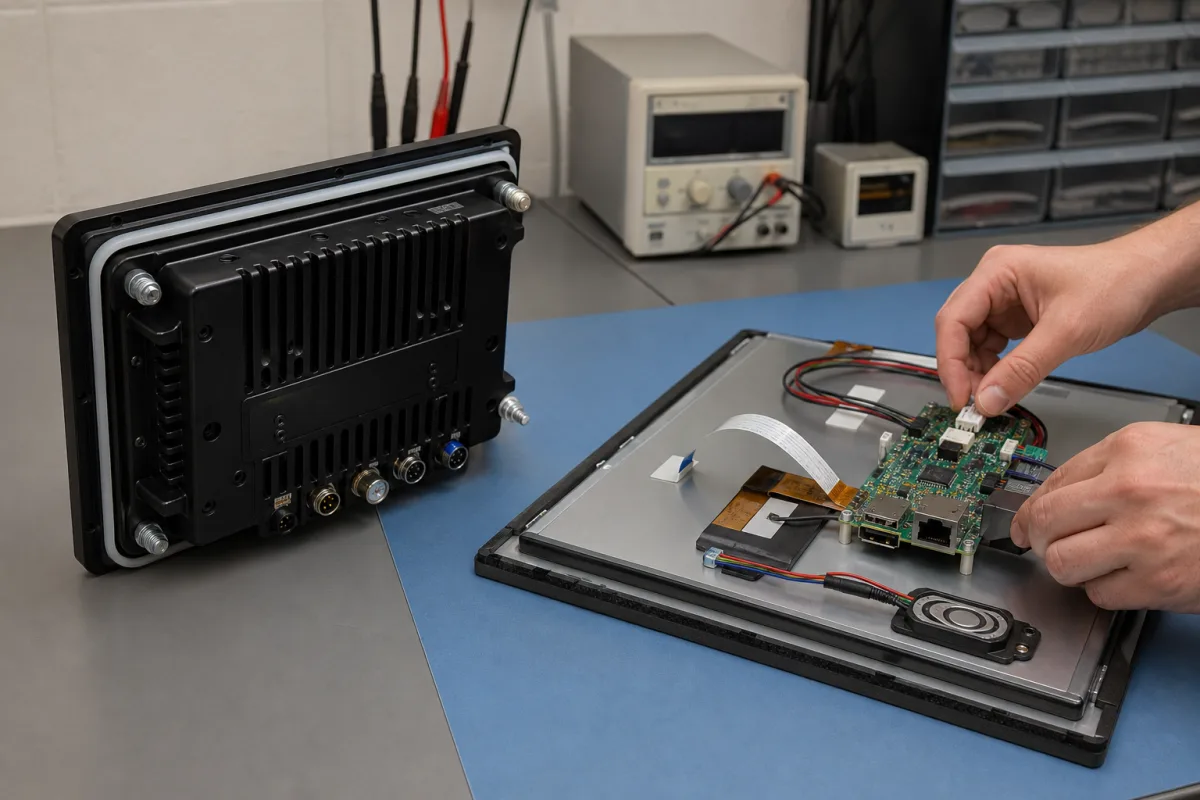
A product manager once showed us a spreadsheet proving that an SBC plus a 10.1-inch LCD cost less than a panel PC. The spreadsheet was correct and the conclusion was wrong. It did not include the touch cable, LVDS harness, backlight board, metalwork, gasket, fasteners, wide-input supply, antennas, assembly time, test fixture, or three months spent fixing display noise.
The opposite mistake is buying an “industrial Android panel PC” because it is complete, then discovering that its rear housing is too deep, the connectors face the wall, the touch firmware fails through the specified cover glass, and the supplier will not provide an Android build environment.
The Android panel PC vs SBC decision is about product boundaries. A panel PC buys an integrated mechanical and electrical subsystem. An SBC-plus-display design gives the OEM control over each part. The better route depends on volume, enclosure, I/O, lifecycle, software ownership, service model, and where the team is willing to carry integration risk.
Draw the Boundary Before Comparing Price
An off-the-shelf panel PC should be evaluated as one finished assembly: LCD, touch, cover glass, enclosure, compute board, cooling, antennas, external I/O, power input, and installed software. A separate architecture includes an SBC, display module or assembly, touch controller, harnesses, mounting, thermal parts, enclosure, and often an interface or power board.
| Decision area | Integrated Android panel PC | SBC plus display |
|---|---|---|
| First working assembly | Fast if a suitable model exists | Fast on the bench; slower in final mechanics |
| Mechanical freedom | Limited to supplier sizes and housing | Full control over depth, mounting, bezel, connectors |
| Display choice | Qualified supplier options | Broad choice, with OEM owning integration |
| Cabling | Internal and supplier-controlled | OEM-designed display, touch, backlight, antenna, and I/O harnesses |
| Thermal path | Existing assembly to validate | Designed with the enclosure and workload |
| Android BSP | Tied to panel-PC supplier | Tied to selected SBC supplier or OEM branch |
| Certification evidence | Available for a defined configuration | Board and module reports plus final-system work |
| Service | Swap complete panel PC | Replace display, SBC, or subassembly separately |
| Unit-cost optimization | Limited without customization | Stronger at volume |
| Initial NRE | Low | Medium to high |
Compare the two at the same boundary: tested, assembled, packed product ready for your application and installation.
A Panel PC Buys Integration Time
If a catalog model already matches the display size, brightness, touch, mounting, I/O, temperature, Android version, and enclosure rating, it can remove months of mechanical and electrical work. The internal display cable is known. The backlight power path exists. The heatsink is attached. The ports line up with the housing.
This is valuable for low volume, a fixed launch date, or teams whose differentiation is in software and service rather than electronics. It is also convenient for field replacement: the technician changes one part number.
But confirm what “standard” really means. Suppliers often build panel PCs from configurable LCD, touch, board, RAM, storage, radio, and connector options. Ask whether your exact combination has been produced and tested. A CE report for the 12-inch Linux model with no Wi-Fi may not describe the 10-inch Android unit with a different radio and power adapter.
Mechanically, get the STEP model, cutout, mounting method, connector drawing, gasket specification, weight, and service-clearance requirements. A panel-mount gasket can help seal the front interface, but the final cabinet installation determines the actual environmental performance.
SBC Plus Display Buys Product Control
Separating the parts lets the product team place the computer away from heat, use a thin display head, choose a high-brightness or optically bonded panel, align connectors with fixed cables, and integrate only the required I/O. It can also support a family: one compute board may drive 7-inch, 10.1-inch, and 15.6-inch products with different harnesses and mechanics.
That flexibility becomes engineering work. The LCD data sheet must be matched to the SBC’s actual output timing and lane configuration. Backlight voltage, current, PWM frequency, enable sequence, and dimming curve need definition. Touch requires a controller, firmware, grounding, cable, driver, coordinate mapping, wake behavior, and noise testing.
Our display integration workflow treats LCD, touch, cable, board, power, and enclosure as one system. Selecting them from six independent catalogs and connecting them late is the expensive route.
For first prototypes, use the intended display interface. HDMI on the bench proves the application can render; it does not close MIPI DSI initialization or LVDS mapping risk.
Cables Decide More Than Engineers Expect
In a panel PC, the supplier owns internal harness drawings and assembly. In a separate design, every cable becomes part of the product BOM and reliability plan. Check conductor size, impedance where relevant, shielding, grounding, bend radius, connector retention, insertion cycles, routing near antennas and switching nodes, and replacement availability.
Display cables are particularly sensitive. A cable that works across an open bench may radiate in an enclosure or show intermittent errors when folded near metal. Touch I2C can pick up LCD or backlight noise. USB touch is easier to enumerate but adds connector and cable bulk. Speaker wiring can inject noise into touch or microphone paths.
Freeze cable drawings with the same discipline as PCBs. Include mating connector manufacturer and part number, crimp contact, wire, shield termination, length tolerance, label, continuity test, and approved supplier. “30-pin LVDS cable” is not an engineering specification.
Thermal Design Follows the Workload
An integrated panel PC has a known mechanical path, but its published temperature rating still needs verification with your application, orientation, and installation. A bright LCD heats the cavity. A wall recess or sealed cabinet reduces convection. Wi-Fi, video decode, Chromium, and continuous CPU load produce different results from an idle launcher.
An SBC-plus-display architecture can move the hot board away from the LCD or couple it directly to a metal rear housing. It can also fail through a poor thermal pad, warped PCB, or enclosure with no spreading area. Test sustained workload until temperatures stabilize and log CPU frequency so a “pass” is not simply heavy throttling.
| Thermal test | Why it matters |
|---|---|
| Maximum ambient, full backlight | Combines display and board heat |
| Worst application workload | Reveals throttling and enclosure temperature |
| Cold boot at minimum ambient | Exposes storage, oscillator, display, and regulator startup issues |
| Repeated power cycling | Checks thermal and mechanical connection stability |
| Cabinet or wall installation | Captures restricted airflow and nearby heat sources |
Fanless does not mean thermally solved. It only states that no fan is present.
Android Requirements Are Mostly Shared
Both routes need a production Android image. Define auto-start, lock task or kiosk behavior, status and navigation controls, peripheral permissions, watchdog, logs, signed update, rollback, factory reset policy, recovery access, and security patch ownership.
Android’s dedicated-device APIs support locking a fully managed device to an allowlisted application or set of applications. That is useful, but a vendor saying “kiosk mode supported” may mean a launcher hack, screen pinning, device-owner provisioning, or a system-image customization. Test escape paths, reboot, network loss, update, crash recovery, USB insertion, and factory reset on the exact image.
An integrated panel PC can simplify software qualification because display and touch are fixed. It creates deeper dependence on that supplier’s BSP. A separate Android HMI system may offer better board and display options, but every approved combination expands regression scope.
Ask for source and build instructions in either case. A complete enclosure does not make a binary-only Android image maintainable.
Certification Follows the Finished Product
A panel PC with reports for the exact hardware, radio, antenna, adapter, and enclosure gives a stronger starting point than separate untested parts. Confirm model numbers and configurations in each report. If you change the radio, cable, power supply, or metalwork, ask a qualified lab whether the evidence remains applicable.
With SBC plus display, collect board and radio reports early, then plan final-product EMC, radio, safety, and environmental work. The enclosure can improve emissions through shielding or make them worse through cable slots and poor bonding. Long display cables and external supplies matter.
In the EU, the company placing the branded final product on the market remains responsible for the applicable conformity assessment and technical file. “All components are CE marked” is not a complete product assessment.
Model the Finished-Unit Cost
For low quantities, panel PC pricing often wins because engineering and tooling are spread across the supplier’s broader volume. At higher quantities, a separate or custom-integrated design may remove margin, unused connectors, adapter boards, excess enclosure material, and assembly steps.
Calculate:
finished cost = purchased parts + harnesses + metal/plastic parts
              + assembly labor + test time + expected scrap
              + amortized NRE/tooling + warranty allowance
Use actual assembly trials. A low-cost cable that takes four minutes to route and can be inserted backward may be more expensive than a keyed harness. Include packaging, mounting accessories, power adapter, antennas, spare-part strategy, and country variants.
A custom panel-PC build becomes attractive when the mechanical and interface value is real and forecast volume can amortize engineering. If requirements are still moving, a standard panel PC may be cheaper insurance.
Service and Product Families Can Reverse the Choice
Swapping a complete panel PC is simple for field staff and expensive if only the LCD failed. A modular design can replace the compute board independently, but service technicians may damage delicate display cables or thermal interfaces. Decide whether the product is depot-repaired, field-repaired, or replaced as one unit.
Product families also matter. A shared SBC with several displays can reduce software branches if the BSP handles panel detection and configuration cleanly. A family of standard panel PCs may reduce mechanical work but create different internal boards and Android images across sizes. Ask the supplier whether the range truly shares a platform.
Keep spare assemblies and released images aligned with the installed base. A five-year service obligation can make revision compatibility more valuable than the initial unit saving.
The Architecture We Would Choose
Choose an off-the-shelf panel PC when a qualified configuration fits without major compromise, volume is low to moderate, time-to-market is critical, and whole-unit replacement is acceptable. Choose SBC plus display when industrial design, depth, display options, connector placement, thermal strategy, or unit-cost optimization differentiates the product.
Before committing, assemble a small pilot using production-intent cables, enclosure, power supply, Android image, and workload. Measure build time, touch stability, thermal behavior, emissions pre-scan, and service access. Then ask a technician who did not design it to replace the unit or subassembly. The architecture that survives that exercise with fewer special instructions is usually the one worth manufacturing.
Official References
Frequently Asked Questions
What is the difference between an Android panel PC and an SBC plus display?
A panel PC integrates the display, touch, compute board, enclosure, thermal solution, and external connectors as one product. An SBC-plus-display architecture lets the OEM select and integrate those parts separately.
Which option reaches market faster?
A suitable off-the-shelf panel PC is usually faster because much of the mechanical, display, cable, and thermal integration already exists. A separate SBC and display is faster only when the panel PC requires major customization or cannot meet a critical requirement.
Is an SBC plus display cheaper than a panel PC?
The component purchase price may look lower, but include cables, brackets, enclosure, power conversion, assembly time, test fixtures, scrap, certification, and engineering. At sufficient volume, an integrated custom design can reduce finished-unit cost.
Can an Android panel PC run in kiosk mode?
Yes, if the Android BSP and device management approach support the required lockdown. Android dedicated-device APIs include lock task mode, but production behavior, update policy, recovery, and privileged integration still need validation on the supplier image.